Skip to content

The platform

The same sidebar you use in the app — explained for your team

Farm Management (including Chat MaziwaIQ), Financials, and Reports are not marketing labels — they mirror the live product navigation so procurement, trainers, and farmers stay aligned.

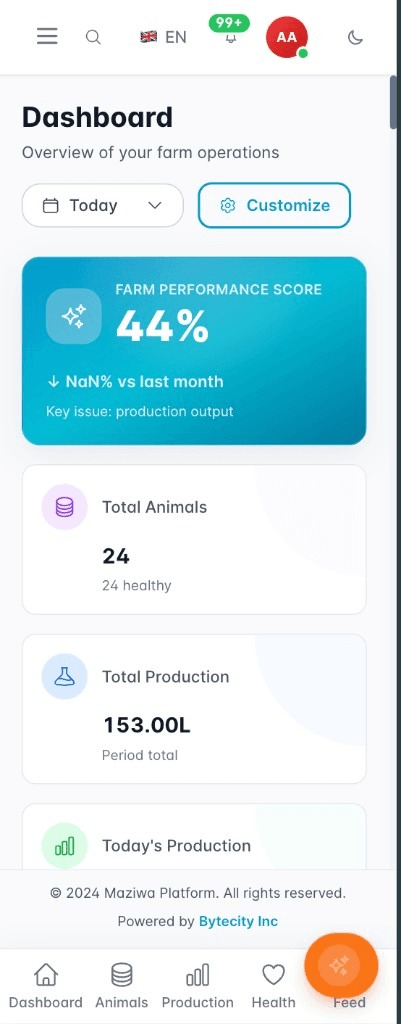
Maziwa mobile app: dashboard, performance score, and key farm metrics

app.maziwa · Dashboard

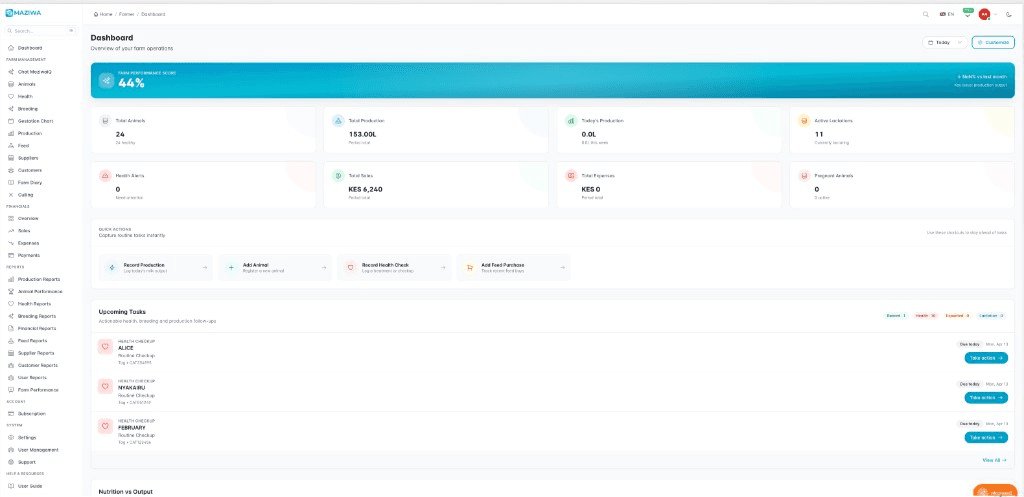
Maziwa desktop dashboard: farm performance score, key metrics, upcoming tasks, sidebar navigation

Four areas your team already recognises

Rollouts go faster when the website uses the same words as the software.

Main

Dashboard — your command centre for the day.

Farm Management

Chat MaziwaIQ, Animals, Production, Feed, Suppliers, Customers, and more.

Financials

Overview, Sales, Expenses, and Payments — cash you can explain.

Reports

Production, health, breeding, financial, and farm performance scorecards.

From dashboard to reportsFour areas matching the app sidebar: Main, Farm Management, Financials, and Reports.MainDashboardFarm MgmtHerd → milk → feedFinancialsSales & cashReportsKPIs & export
Same top-level structure as the live product — not a marketing-only hierarchy.

In the app today

Main

  • Dashboard

Farm Management

  • Chat MaziwaIQAI
  • Animals
  • Health
  • Breeding
  • Gestation Chart
  • Production
  • Feed
  • Suppliers
  • Customers
  • Farm Diary
  • Culling

Financials

  • Overview
  • Sales
  • Expenses
  • Payments

Reports

  • Production Reports
  • Animal Performance
  • Health Reports
  • Breeding Reports
  • Financial Reports
  • Feed Reports
  • +4 more report types in the app
  • In-app AI for everyday herd calls

    Chat MaziwaIQ

  • Yield by animal and milking round

    Production & sessions

  • Sales, expenses, payments in one place

    Financials overview

Farm Management

From Chat MaziwaIQ to Farm Diary — every farm workflow in one column

Chat MaziwaIQ is called out in-app as AI-powered guidance for everyday herd decisions. It sits alongside Animals, Health, Breeding, Gestation Chart, Production, Feed, Suppliers, Customers, Farm Diary, and Culling — the same order as the sidebar.

That means health rounds, breeding programmes, and feed plans all read the same animal IDs you use in production and sales.

  • Chat MaziwaIQ
  • Animals
  • Health
  • Breeding
  • Gestation Chart
  • Production
  • Feed
  • Suppliers
  • Customers
  • Farm Diary
  • Culling
Farmer using a tablet while checking on livestock
Milk and dairy production quality

Production · feed · commercial

Litres, rations, and buyer relationships — tied to the same animals

Production covers milk yield by session and animal. Feed tracks rations, inventory, and consumption so cost-per-litre drivers stay visible.

Suppliers and Customers split the way the app does: inputs that keep the farm running vs buyers and relationships that move litres.

Dairy cattle — herd records in Maziwa

Herd profiles stay the anchor whether you are logging milk, feed, or a sale.

Financials

Overview · Sales · Expenses · Payments

The Financials section matches the app: cash position, sales, categorised spend, and payments in and out — so field teams and finance aren't maintaining parallel ledgers.

  • Cash position and trendsOverview
  • Milk and product revenueSales
  • Categorised farm spendExpenses
  • Inbound and outbound moneyPayments
Records to insightFarm records at the base, financials in the middle, reports and KPIs on top.Reports & KPIsSales · expenses · paymentsAnimals · milk · health · feed
One database — financials and reports read the same herd and production events.

Reports

Report names your GM can check against the app

Production through Farm Performance — aligned with the Reports menu, including supplier, customer, and user activity views when you need accountability, not another pivot table.

  • Production ReportsYield and quality over time
  • Animal PerformancePer-head productivity
  • Health ReportsIncidents and compliance
  • Breeding ReportsConception and calving KPIs
  • Financial ReportsP&L-ready views
  • Feed ReportsCost per litre drivers
  • Supplier ReportsPartner and vendor analytics
  • Customer ReportsBuyer-side analytics
  • User ReportsTeam activity and access
  • Farm PerformanceHolistic operational scorecards
Live product — dashboard (marketing capture)
Maziwa desktop dashboard: farm performance score, key metrics, upcoming tasks, sidebar navigation
Cattle on pasture — farmer community and field operations

Help & Resources

  • User GuideStructured documentation
  • Video TutorialsSee workflows end-to-end
  • FAQFast answers
  • Farmers ForumCommunity and peer learning

Account

  • SubscriptionPlans and billing

System

  • SettingsFarm and preferences
  • User ManagementRoles for staff and agents
  • SupportHelp when routes break

Next step

See it with your own data

Get started in minutes on the web, or open the app if your team is already on Maziwa.